

Status and alerts
Every deployed workflow has a status, computed by the vault from the runs it records. A change of status sends one alert to the route you set for the workflow’s scope.
Status
| Status | Means |
|---|---|
| Healthy | Recent runs are finishing. |
| Failing | Too many recent runs failed (below). |
| Stuck | A run has made no progress for three times the workflow’s usual step time, and at least 10 minutes. |
| No runs yet | Deployed; nothing has run in the last 7 days. |
| Not deployed | No live version. |
A workflow is Failing when 20% or more of its runs in the last hour failed, and recovers when fewer than 10% did. It needs at least 5 runs to judge: with fewer in the last hour, the last 5 runs of the past 7 days are used, and with fewer than 5 in all, the status stays as it is. Failing beats Stuck beats Healthy.
Experiment runs are not counted.
The status is a dot in the Workflows list and on the Dashboard, and a pill with the live version in the workflow’s header (● Failing · 0.4.2).
Overview tab
The workflow’s Overview tab opens by default once it is deployed.
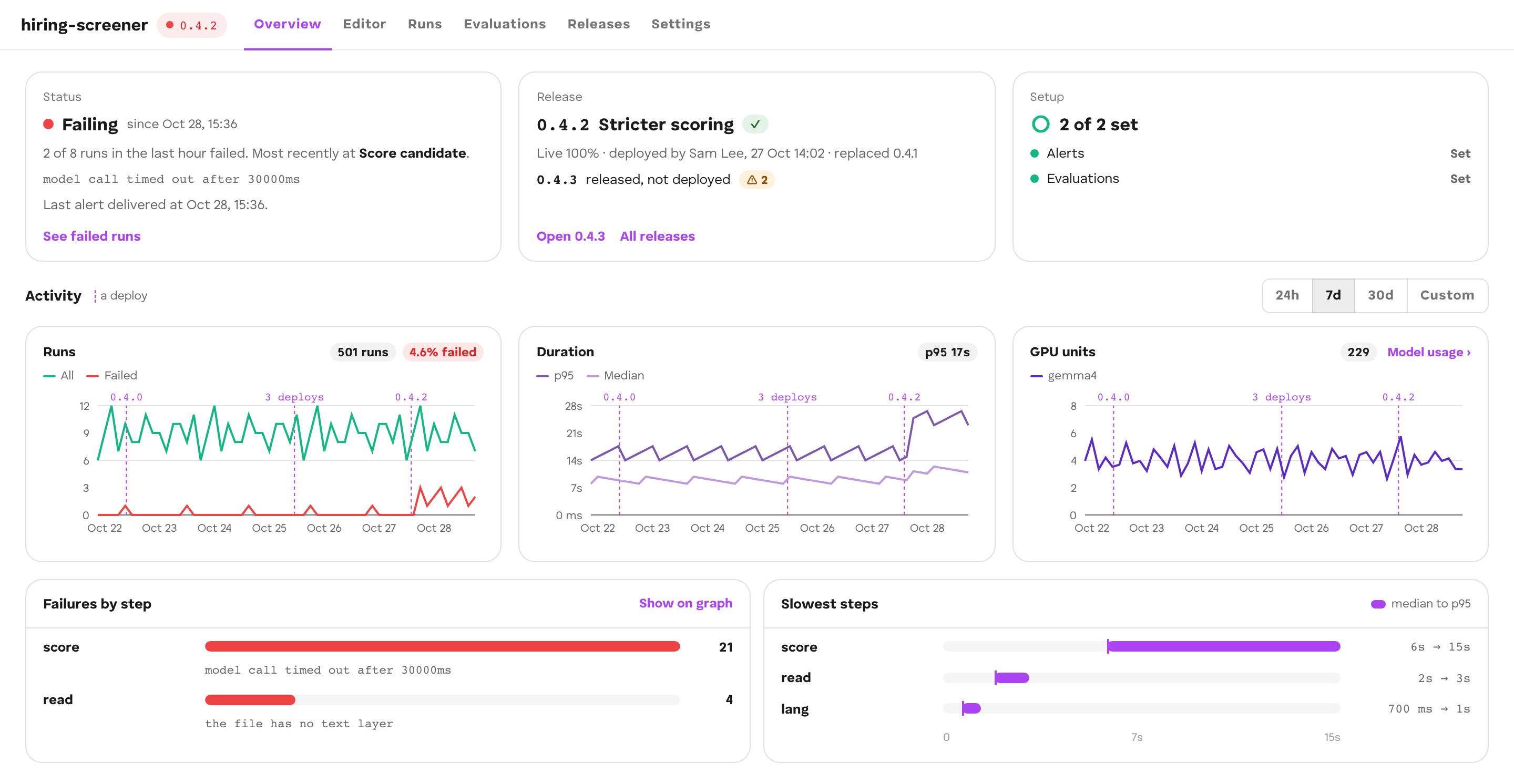
| Card | Shows |
|---|---|
| Status | The status and since when, why (2 of 8 runs in the last hour failed. Most recently at Score candidate.), the last error, and whether the last alert was delivered. See failed runs opens the Runs tab. |
| Release | The live release and its checks. See Release and deploy. |
| Setup | What a workflow needs before you rely on it, as N of 2 set. |
Below them, over 24h, 7d, or 30d: Runs, Failed, Duration, and GPU units, each against the period before, with a marker at every deploy (deploys close together share one, such as 3 deploys). Drag across a chart to zoom all three to that window. GPU units counts the model calls made for the workflow’s runs, including those of the agents its Agent steps ask. Failures by step ranks the steps runs failed at, with the last error; Slowest steps ranks steps by duration. Show on graph puts them in view on the canvas.
Setup
| Check | Set when | Fix |
|---|---|---|
| Alerts | The workflow’s scope has an alert route, and its last alert was delivered. | Settings → Alerts |
| Evaluations | A dataset is Required for release. | Evaluations → dataset heading |
A check that is missing or failing links to its fix.
Owners and description
A workflow’s owners and description are asked for when you create it, and edited on Settings → About. Owners are email addresses: they are shown in the Workflows list and tagged in every alert. Add me adds you.
Alerts
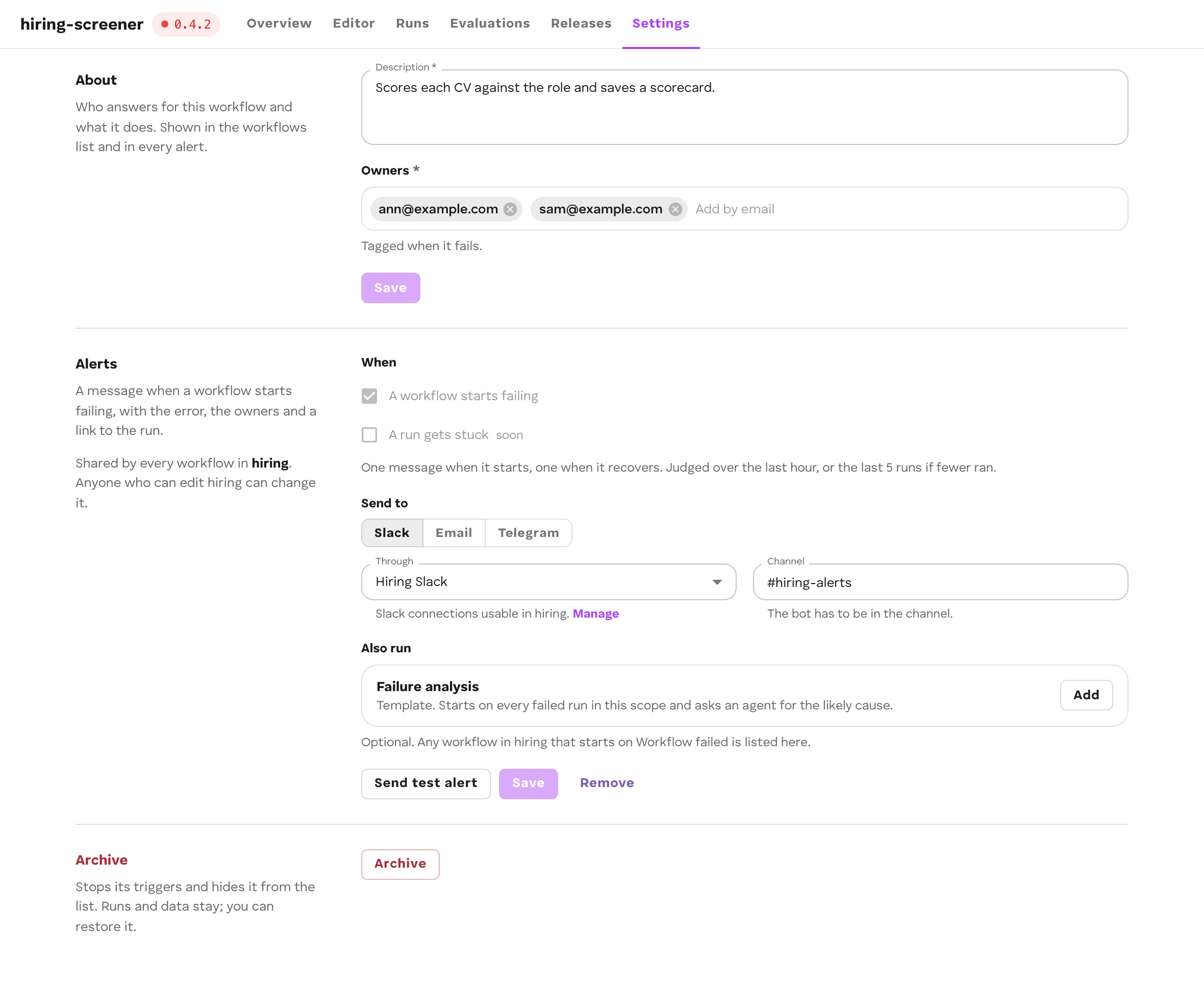
Open Settings → Alerts. The route belongs to the scope, not the workflow: every workflow in the scope sends to it.
| Field | What to set |
|---|---|
| When | A workflow starts failing, and one message when it recovers. |
| Send to | Slack, Email, or Telegram. |
| Through | A connection of that kind in the scope. Manage opens Connectors. The alert is sent with this connection, as any connector action is. |
| Channel / To / Chat ID | Slack: a channel the bot is in. Email: one or more addresses, separated by commas. Telegram: the chat ID, or @name for a public channel. |
| Also run | Optional. Lists the workflows in the scope that start on Workflow failed. Failure analysis adds a template that asks an agent for the likely cause of each failed run. |
Send test alert sends a sample of the message now through the connection, and says whether it was delivered. Save stores the route; Remove deletes it.
The message
@ann @sam🔴 hiring-screener is failing — 2 of 8 runs failed in the last hourScore candidate: model call timed out after 30000ms · release 0.4.2Open the failed runThe owners are tagged first. Open the failed run links to the run in ROC; it appears when your Manykind deployment links alerts to ROC. When the workflow recovers, one line, with no tag:
✅ hiring-screener recovered — was failing for 58 minOne message per change of status, never one per failed run. A message that could not be delivered is retried; if it still fails, the Status card says Alerts are not being delivered and the Setup check shows Failing with the reason (for example, a revoked connection).
With no route in the scope, nothing is sent, and the Status card says so.
Limits
| Limit | Value |
|---|---|
| Status window | 1 hour, at least 5 runs (7 days back at most) |
| Failing / recovered | 20% failed / below 10% failed |
| Stuck | 3 × the workflow’s usual step time, at least 10 minutes |
| Alert routes | One per scope |
| Run history behind the charts | 35 days |