

Connectors
A connector links a vault to an outside system. It is set up once per vault, its secrets are sealed in the vault, and workflows the vault connects can then start on that system’s messages and act on it.
| Term | Means |
|---|---|
| Connector | A kind of outside system the vault supports, e.g. Slack. |
| Connection | One configured account of a connector in a vault, holding its sealed credentials. |
| Access | One agent’s permission to use one connection: which actions it may take and which events it receives. |
Connections belong to the customer, not to your Agent Service. Your workflow uses a connection the vault owner set up; it never sees the secret.
Available connectors
| Connector | Credential | Starts a run on | Actions |
|---|---|---|---|
| Slack | Bot token and signing secret from your own Slack app | Message received: a person posted in a channel the app is in, or mentioned it. Filter by channel. | Send message, Send direct message, Update message, Add reaction |
| Email (SMTP) | SMTP host, port, starttls or tls, username, password |
Send email | |
| Telegram | Bot token from @BotFather | Message received: a message to your bot. Filter by chat. | Send message |
| MCP server | Server URL and a static key (optional for a public server) | The server’s own tools, discovered per connection |
Every connector describes its settings, secrets, actions, and events. Read the
catalogue with vault.connectors().
Add a connection in ROC
Only an admin of the vault can add, change, or revoke connections.
- Open Connectors and choose Add connection.
- Pick the system.
- Fill in Name, Usable in (the scopes workflows may use it from), Settings, and Secrets. Follow Before you start for the steps on the outside system.
- For Slack, copy the Request URL shown after the connection is added into your Slack app’s Event Subscriptions. Telegram registers its webhook for you.
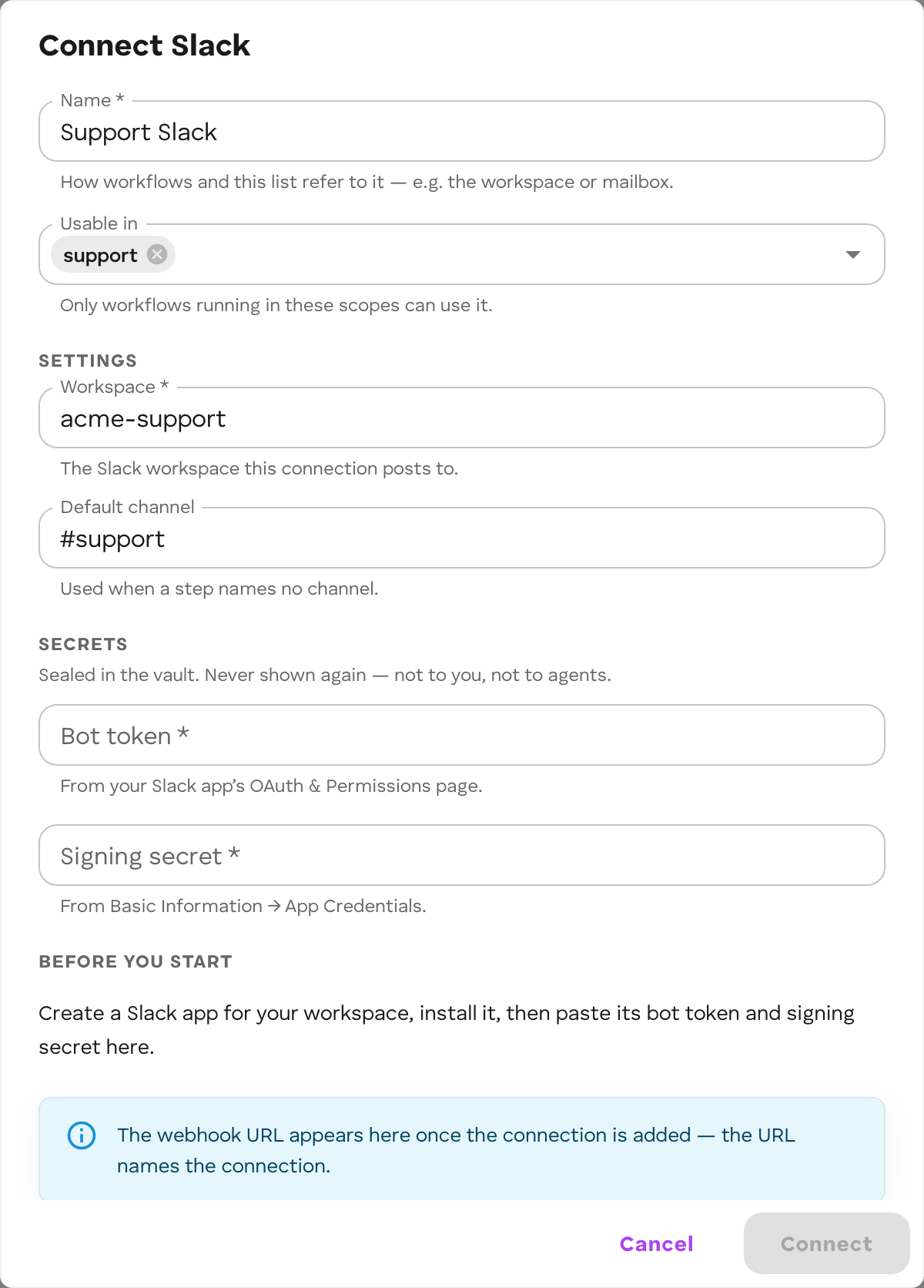 Secrets are sealed in the vault and never shown again: not to you, not to agents.
To change one, use Update secrets. To remove a connection and every agent’s
access to it, open it and choose Revoke this connection.
Secrets are sealed in the vault and never shown again: not to you, not to agents.
To change one, use Update secrets. To remove a connection and every agent’s
access to it, open it and choose Revoke this connection.
Use from a workflow
In the Workflow Builder, a connector appears where its step goes:
- Under Triggers, when it can start runs. Pick the system, then the event, then the connection. A run starts each time a matching message arrives. See Triggers.
- Under Actions, when it can act. See below.
Add a connector action step
- Open Add node → Actions and pick the connector, then the action. A connector whose actions come from the connected server (an MCP server) offers Choose an action instead.
- Choose the {System} connection. Only connections usable in the workflow’s scope are offered. If none is, add one (or add the scope to one) on the Connectors page and press Refresh.
- Fill the Input fields: type a value, or click a box and then a field of the incoming item to map it.
- Deploy.
The step’s parameters, each connector’s actions, its error codes, and its limits are on Steps: Connector action.
Access is part of the deploy
When you deploy a workflow, ROC grants it exactly the actions and events its graph uses on each connection, in the workflow’s own scope, and removes access to connections it no longer uses. Editing a graph to reach a new connection takes effect only when you deploy it.
A workflow deployed from code needs the same grant. The vault owner (or a member with write on the workflow’s scope) grants it through the vault API:
PUT /api/v1/vaults/:vaultId/agents/:agentId/connections/:connectionId{ "actions": ["send_message"], "events": [], "filter": {} }The workflow must already be connected to the vault. Sending empty actions and
events removes the grant. vault.agents.setConnection below does the same
from the Vault SDK.
From code
The Vault SDK exposes the same model, for consoles and admin tools:
const catalogue = await vault.connectors();
const slack = await vault.connections.create({  connector: "slack",  name: "Support workspace",  scopes: ["support"],  config: { defaultChannel: "C0123456789" },  secrets: { botToken: "xoxb-…", signingSecret: "…" },});
await vault.agents.setConnection(agentId, slack.id, { actions: ["send_message"], events: ["message.received"],});| Call | Does |
|---|---|
vault.connections.list() |
The vault’s connections. Non-admins get no config. |
vault.connections.create(body) |
Add one; secrets go in and never come back out. |
vault.connections.update(id, body) |
Omitted keys stay; omitted secrets keeps the sealed ones. |
vault.connections.revoke(id) |
Revoke it and every agent’s access to it. |
vault.connections.actions(id) |
The actions a connection offers now (an MCP server’s tools). |
vault.agents.connections(agentId) |
What one agent may do with each connection. |
vault.agents.setConnection(agentId, connectionId, { actions, events, filter? }) |
Set that access. Both lists empty removes it. |
vault.agents.removeConnection(agentId, connectionId) |
Remove that access. |