

Datasets
A dataset is the set of cases one workflow is judged on. Each case is a start payload and the Result that payload should produce.
Create a dataset
In ROC. Open the workflow, select Evaluations, then New dataset (or Create empty dataset on a workflow with none). Give it a Name, an optional Description, and optional limits: Max duration (s), Max tokens, Max steps, Max cost ($). The sidebar Evaluations page has the same New dataset button with a Workflow picker.
With the CLI. Run it in the workflow’s project folder; --workflow defaults to the workflow your cef.config.ts (or dist/) declares.
cef eval create triage --description "support tickets by category" --max-duration-ms 30000| Flag | Meaning |
|---|---|
--description <text> |
What the dataset covers |
--max-duration-ms <n> |
Warn when a run takes longer |
--max-tokens <n> |
Warn when a run uses more tokens |
--max-steps <n> |
Warn when a run takes more steps |
--max-cost <n> |
Warn when a run costs more |
Dataset names match ^[a-z0-9][a-z0-9-]{0,62}$ and are unique per workflow. Every cef eval command needs store credentials.
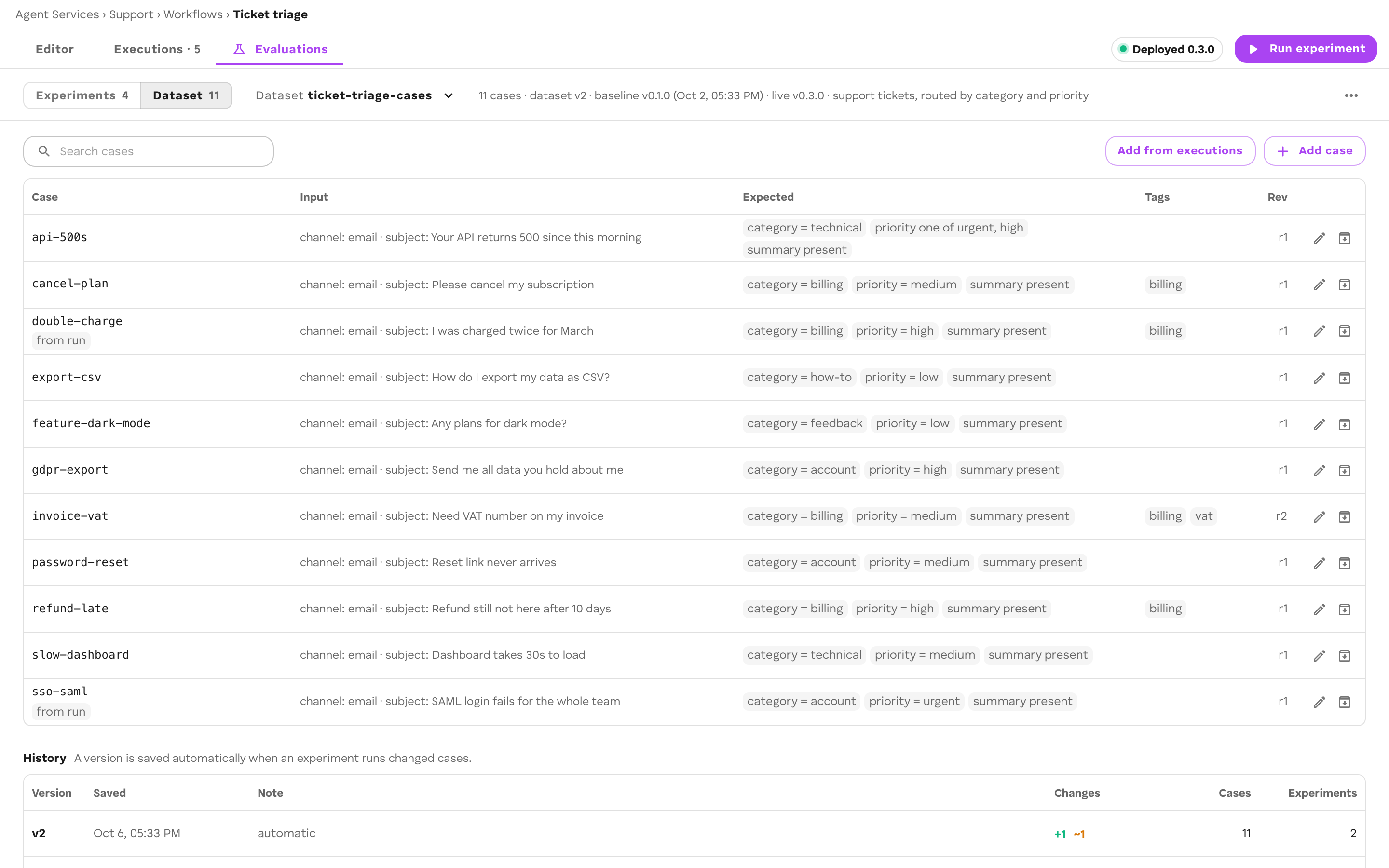
Case shape
{ "id": "double-charge", "input": { "ticketId": "T-1001", "text": "I was charged twice for March" }, "expected": { "category": "billing", "confidence": ">= 0.8", "summary": { "$exists": true } }, "limits": { "maxDurationMs": 20000 }, "tags": ["billing"], "notes": "Seen in production twice in one week."}| Field | Required | Meaning |
|---|---|---|
id |
yes | [A-Za-z0-9._-], 1–80 characters. Stays taken after the case is deleted. |
input |
yes | The workflow.start payload, as an object. |
expected |
no | Keyed by Result field; dot paths reach nested fields. A case with no expectations runs but is not scored. See Results. |
limits |
no | maxDurationMs, maxTokens, maxSteps, maxCost. Each overrides the dataset’s own. |
tags |
no | Free labels for filtering. |
notes |
no | Free text. |
source |
no | Set when the case was captured from a run: { context, workflowVersion?, capturedAt }. |
input is exactly what an experiment publishes as workflow.start, so it must contain everything your trigger step reads.
Add cases by hand
In ROC, on the Dataset view select Add case. Fill in Case id, Input (workflow.start payload), the Expected result, Tags, and Notes. Editing a case and choosing Save revision writes a new revision; the old one stays.
In your repo, pull the dataset, edit the JSON, and push it back:
cef eval pull triage # writes datasets/triage/$EDITOR datasets/triage/cases/double-charge.jsoncef eval push triagepull writes this layout (change it with --dir):
datasets/triage/header.json the dataset header (without the baseline)datasets/triage/cases/<caseId>.json each live case at its latest revisiondatasets/triage/.versions.json what the last pull wrote: revisions, content hashes, versionsA case file must be named <id>.json. Commit the folder with your workflow so cases are reviewed in the same pull request as the change they test.
| Command | Flag | Meaning |
|---|---|---|
pull |
--force |
Overwrite case files edited locally since the last pull or push |
push |
--cut [note] |
Cut a dataset version after pushing |
push |
--force |
Write over cases that changed in the bucket since the last pull |
push |
--prune |
Delete cases the last pull wrote that you have since removed locally |
push |
--restore |
Undelete or unarchive cases that are deleted or archived in the bucket but present locally |
push writes a new revision only for a case whose content changed. Without --force, it refuses a case that someone edited in the bucket since your last pull, and pull refuses to overwrite a case file you edited locally. Neither removes a case file the last pull did not write. Both refuse a dataset folder whose header.json names another workflow.
Add cases from real runs
A run that went wrong in production is the best case you will get. Capture it instead of retyping it.
In ROC:
- On a run in Executions, select the Add to dataset button next to Re-run. Pick a Dataset (or type a New dataset name) and confirm the Case id.
- On the Dataset view, select Add from executions and pick from the workflow’s recent runs.
In code, caseFromRun from @cef-ai/eval builds the same case:
import { addCase, caseFromRun, uniqueCaseId, listCaseIds } from "@cef-ai/eval";
const c = caseFromRun({  input: startPayload,                 // the run's workflow.start payload  output: completedPayload.output,     // workflow.completed output, if the run completed  context: "support-4821",  workflowVersion: "1.3.0",  tags: ["from-production"],});c.id = uniqueCaseId(c.id, await listCaseIds(store, "ticket-triage", "triage"));await addCase(store, "ticket-triage", "triage", c);
What a captured case expects:
| The run’s output field is | The case expects |
|---|---|
| A label (60 characters or fewer and 8 words or fewer) | That exact value |
| Free text (longer than that) | { "$exists": true }: the field is present |
| Not an object, or the run did not complete | No expectations: state them yourself |
An inline graph in the start payload is dropped from the input.
A captured case expects what the workflow did, not what it should have done. Review every captured expectation before you run an experiment, and fix the ones that captured the bug.
Archive and delete
| Action | Effect |
|---|---|
| Archive | Hides the case from new dataset versions. Its bytes are untouched; versions that pin it still load. |
| Delete | Removes the case from the working set. Its revisions stay (versions may pin them) and its id stays taken. |
Both are reversible. cef eval push --restore brings a case back if it is still in your repo folder.
Versions
You rarely cut a version by hand. When an experiment starts without a dataset version, it compares the working set (every live case at its latest revision) with the latest version:
- unchanged: the experiment runs that version;
- changed: a new version is cut with the note
auto: <n> added, <m> edited, <k> removed, and the experiment runs it.
cef eval push --cut "note" cuts one explicitly. The History table on the Dataset view lists each version with Version, Saved, Note, Changes, Cases, and Experiments.
A version pins each case at one revision by sha256. Revisions are never rewritten, so an experiment from months ago reloads exactly the cases it ran.
Storage
Datasets live in your Agent Service’s bucket, beside the experiments that ran them:
workflows/<wf>/datasets/<dataset>/header.json header (+ baselineId)workflows/<wf>/datasets/<dataset>/cases/<caseId>/r<n>.json write-once revisionsworkflows/<wf>/datasets/<dataset>/cases/<caseId>/deleted.json delete flagworkflows/<wf>/datasets/<dataset>/archived/<caseId>.json archive flagworkflows/<wf>/datasets/<dataset>/versions/v<n>.json frozen versionsworkflows/<wf>/experiments/<expId>/… experiments and their runs<wf> is the workflow’s id (its agent alias). ROC, the CLI, and @cef-ai/eval read and write the same keys.
Anyone who can write a dataset can change what counts as a pass. Treat write access to a dataset like write access to the workflow it tests.
Related
- Next: Experiments
- Evaluations overview
- Results: how
expectedis matched @cef-ai/evalreference