

Evaluations
This group covers evaluating a workflow: this overview, then datasets of cases, experiments that run them, and the typed Result they are matched against.
An evaluation answers one question before you switch a workflow to a new version: does it still produce the right Result, and what does it cost? You keep a dataset of cases, run a workflow version over it as an experiment, and compare that experiment with a baseline.
Evaluations are warn-only. Nothing in them blocks a push or a deploy; you decide what a regression means for your release.
The parts
| Term | What it is |
|---|---|
| Dataset | A versioned set of cases for one workflow. Names are unique per workflow. |
| Case | One workflow.start payload (input) and what the run’s Result should be (expected). |
| Dataset version | A frozen cut of a dataset: every live case pinned at one revision. Cut automatically when an experiment runs changed cases. |
| Experiment | One dataset version run against one workflow version, each case run repeats times. |
| Run | One case × one repeat inside an experiment, with its output, scores, and metrics. |
| Result | The fields a workflow’s Result step (output step) declares. Runs are scored against these fields and nothing else. |
| Baseline | The experiment other experiments on a dataset are compared to. |
dataset "triage" v3 ──┐ ├─► experiment exp-… ──► runs (case × repeat) ──► scores + metricsworkflow v1.4.0 ──────┘ │ ▼ compare with the baseline experimentHow a run is scored
- The experiment publishes the case’s
inputas aworkflow.startevent into a context of its own (eval-<experimentId>-<caseId>-<repeat>-a<attempt>). - The workflow runs as it would for any other start event: real model calls, real agent steps, real cubby writes.
- When the run ends, its
workflow.completedoutput (the declared Result) is matched field by field against the case’sexpected. - The run’s duration, tokens, cost, and step count are read back from the platform and checked against the dataset’s limits.
A case passes when every judged field passes. Limits only warn; they never fail a case. See Results for the matching rules.
An experiment runs your workflow for real. Every run calls models, writes cubby rows, publishes events, and performs connector actions. Run experiments in a vault where that is safe, and make side-effecting steps idempotent. An experiment’s runs have ids starting with run-eval-, so rows you key on {{ $runId }} are easy to tell apart.
Evaluations and tests
| Local tests | Evaluations | |
|---|---|---|
| Runs | On your machine, in-process | On the platform, against a deployed version |
| Models | Mocked | Real |
| Checks | Exact behaviour: cubby rows, events, branches, budgets | The Result, plus duration, tokens, cost, steps |
| Answers | “Does the graph do what I wrote?” | “Is this version as good as the last one, on real inputs?” |
| Use | Every commit | Before switching the live version, after prompt or model changes |
Use both. Tests pin down logic that must never change; a dataset catches the quality drift that only real model calls show. See Test a workflow.
Where evaluations live
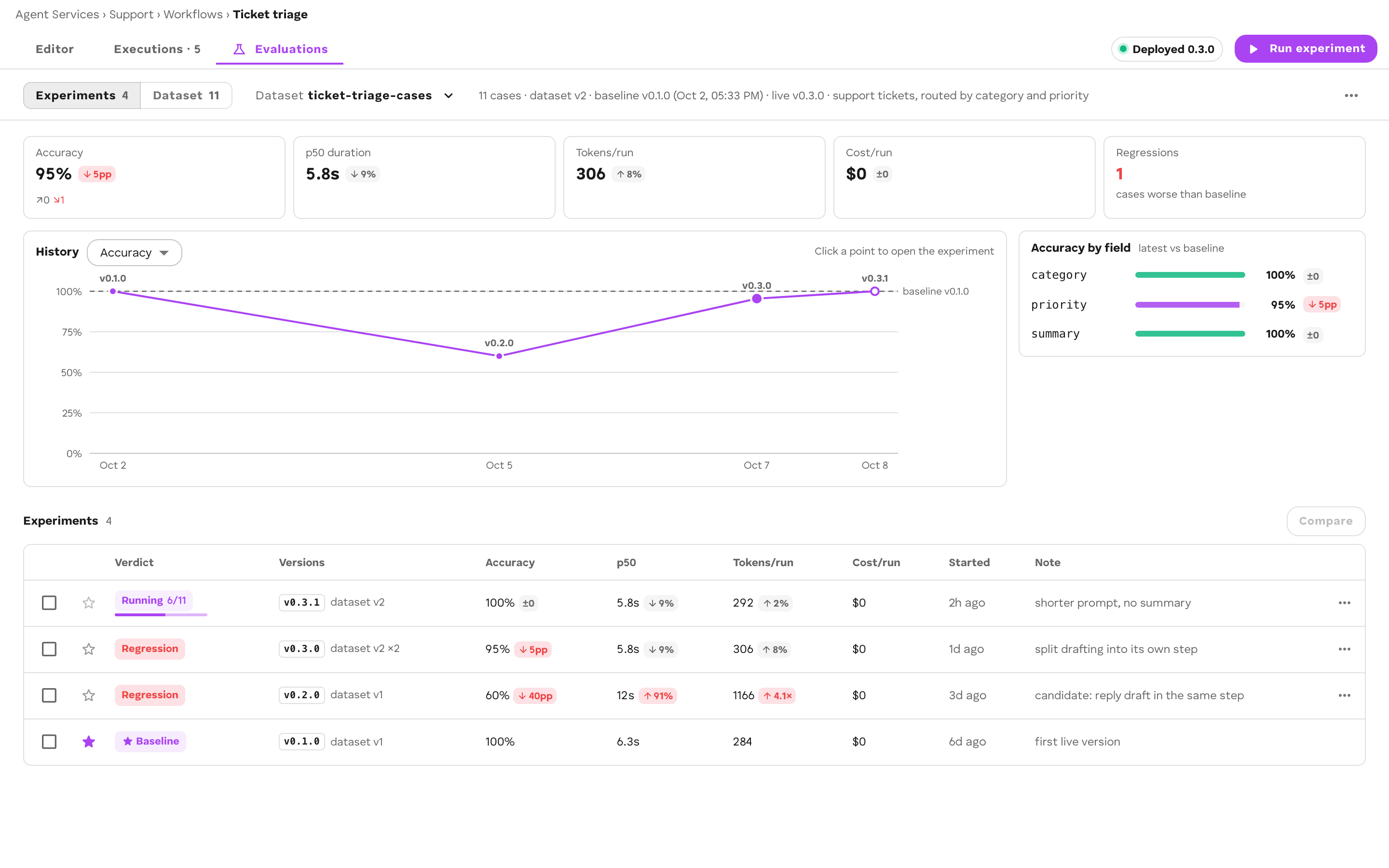
ROC. Open a workflow and select the Evaluations tab. It has two views:
- Experiments: the headline metrics (Accuracy, p50 duration, Tokens/run, Cost/run, Regressions), a History chart, Accuracy by field, and the experiment list with a Verdict per experiment.
- Dataset: the cases, Add from executions, Add case, and the dataset’s History of versions.
Run experiment starts an experiment from either view. The Evaluations item in the sidebar lists every dataset across the Agent Service’s workflows, with each one’s Latest verdict and Accuracy.
 CLI.
CLI. cef eval reads and writes the same storage as ROC, so either sees what the other wrote:
cef eval create triagecef eval pull triage # cases into ./datasets/triage/cef eval push triage # your edits back as new revisionscef eval run triage # run against the live versioncef eval compare <base> <candidate>Library. @cef-ai/eval is the browser-safe library both ROC and the CLI use. Use it to build your own tooling over the same storage.
Storage
Datasets and experiments are JSON objects in your Agent Service’s bucket, under workflows/<workflowId>/. Case revisions and dataset versions are write-once, so an old experiment always reloads exactly the cases it ran. See Datasets.