

Triggers
A trigger step is where a run starts. The event that starts it becomes the run’s first carried item. A workflow can have several triggers, for example a schedule for the nightly batch and an Event trigger for testing by hand. Each trigger mode is told apart by how its event arrives, so they never compete.
| Mode | Builder entry | Starts a run when |
|---|---|---|
| Event | Event | a workflow.start event targeted at the workflow arrives |
| Schedule | Schedule | the vault’s clock reaches a cron boundary |
| Webhook | Webhook | another system calls the workflow’s URL with a key |
| Connector | the connector’s name, under Triggers | a message arrives through a vault connection |
Every trigger fires only in vaults the workflow is connected to. See Connect to a vault.
Event
The default trigger. A run starts when a workflow.start event targeted at the workflow is published into the scope the workflow is connected on. The event’s payload is the first item.
Three things publish it:
- the Run button on the workflow’s Executions tab in ROC;
- an app, through the vault SDK;
- another agent or workflow.
// From an app, with @cef-ai/vault-sdkawait vault.scope("default").publish({ type: "workflow.start", context: `ticket-${ticketId}`, // one run per context target: "<agentServicePubkey>:ticket-triage", payload: { ticketId, text, customer },});The context names the run: a second workflow.start in a context that already has a run is ignored. Use a fresh context per run, or a deterministic one (such as the ticket id) to make retries safe.
| Param | Builder label | What it does |
|---|---|---|
eventType |
Event type | Keep workflow.start. |
sample |
Example payload | JSON text that prefills the Run dialog’s What starts it field. |
{ id: "ticket", kind: "trigger", params: { eventType: "workflow.start", sample: JSON.stringify({ ticketId: "T-1", text: "I was charged twice" }) } }A workflow.start payload may also carry participants (see People in workflows) and from: "<stepId>" to start the run at a chosen step instead of the trigger.
Schedule
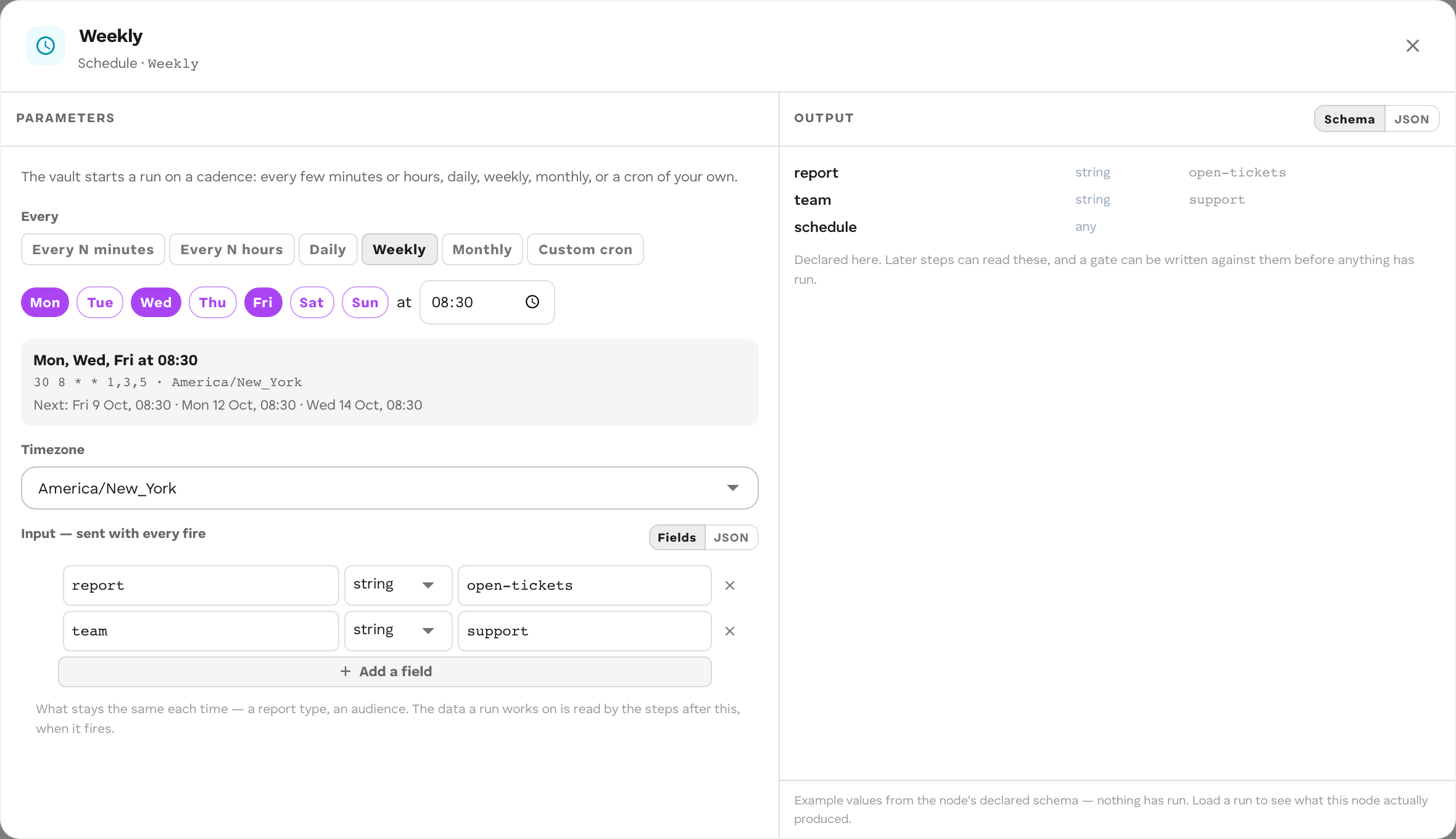
The vault starts a run on a cron schedule, once per connected vault: a workflow connected to three vaults fires three times at each boundary, each run in its own vault.
In the Builder
Add Schedule from Triggers and choose a cadence under Every: Every N minutes, Every N hours, Daily, Weekly, Monthly, or Custom cron. Pick a Timezone and, under Input — sent with every fire, the fields every run receives. The panel shows the next fire time. Deploy installs the schedule.
In code
A schedule is a trigger step with mode: "schedule" plus an entry in schedules whose id is that step’s id:
defineWorkflow({ id: "ticket-digest", version: "0.1.0", nodes: [ { id: "nightly", kind: "trigger", params: { mode: "schedule" } }, // … ], edges: [/* … */], schedules: [ { id: "nightly", cron: "0 6 * * 1-5", timezone: "Europe/Amsterdam", eventType: "workflow.start", payload: { window: "24h" }, }, ],});| Field | What it is |
|---|---|
id |
The schedule trigger’s step id. Stable across versions: renaming it removes one schedule and adds another. |
cron |
Five fields (minute hour day-of-month month day-of-week), or a descriptor such as @daily. No seconds field. |
timezone |
IANA name. UTC when omitted. |
eventType |
workflow.start. |
payload |
Merged into every fire’s payload. |
What a run receives
The declared payload plus a schedule block:
{ "window": "24h", "schedule": { "id": "nightly", "firedAt": "2026-10-08T04:00:00Z", "previousFiredAt": "2026-10-07T04:00:00Z", "cron": "0 6 * * 1-5", "timezone": "Europe/Amsterdam" }}Behavior
- A fire that is missed (the vault was not running at that time) is skipped, never backfilled. The schedule continues from the next boundary.
- A schedule with an invalid cron or timezone does not stop the deploy; it stays silent and records the error on the schedule.
- Pressing Run on a workflow whose only trigger is a schedule enters at the schedule trigger, so you can test it by hand.
Schedule limits
| What | Limit |
|---|---|
| Granularity | 1 minute: a 5-field cron, or an @hourly / @daily-style descriptor. An expression with a seconds field is refused. |
| Late fire | A fire more than 4 minutes late is skipped. Make each run cover “since the last run”, not “the last minute”. |
Webhook
Another system calls the workflow’s URL with a key, and each call starts a run. The caller can get an answer at once or wait for the run’s result.
Set it up
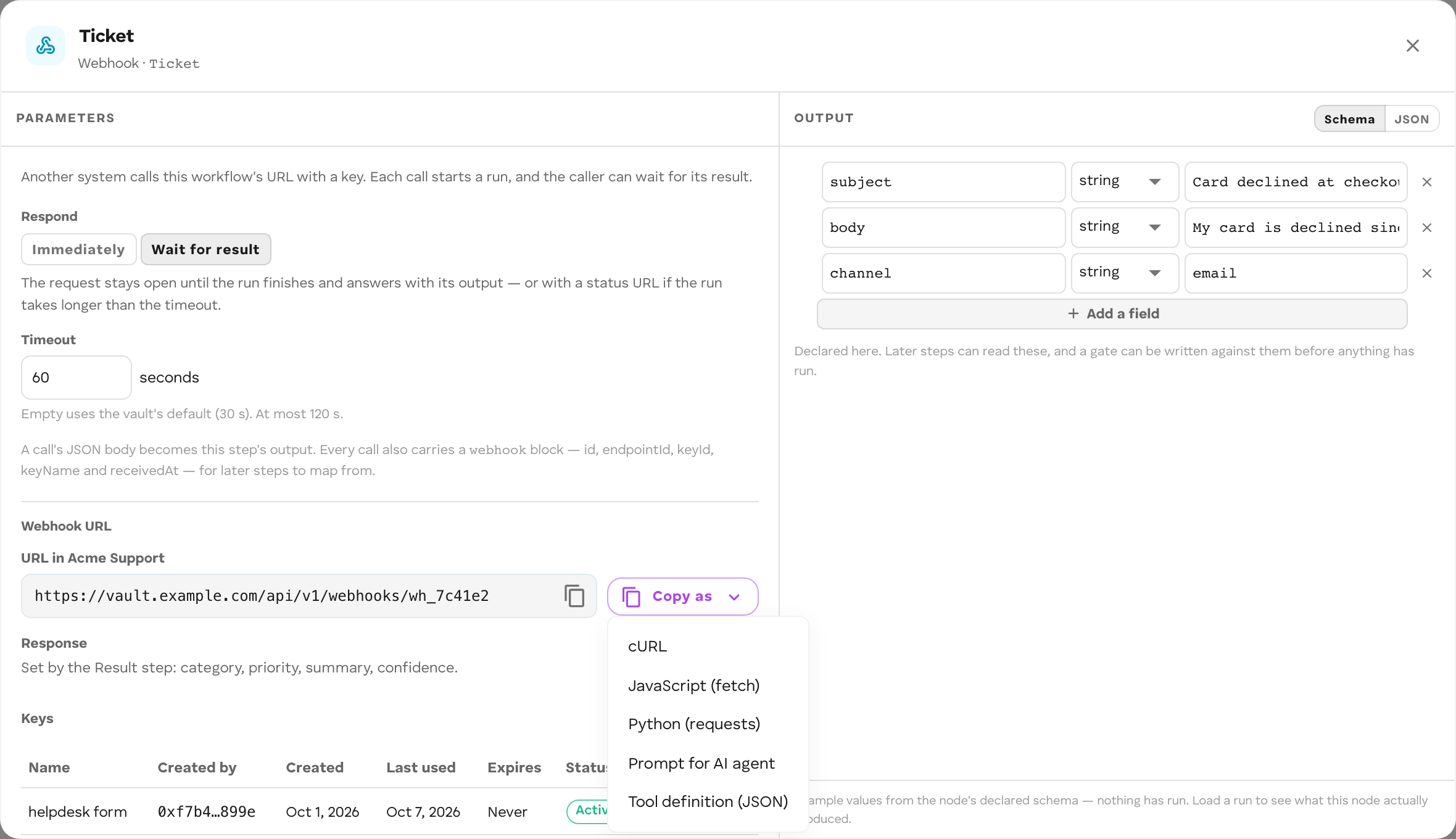
- Add Webhook from Triggers. Choose Respond: Immediately or Wait for result, and a Timeout (seconds) for waiting calls.
- Deploy. The trigger’s panel shows the Webhook URL for the vault the workflow runs in.
- Under Keys, choose Create key, give it a Name and an optional expiry. Copy the key: it is shown once.
A run started with a key runs as the member who created the key. If that member loses write access to the workflow’s scope, calls are refused. Revoke a key from the same panel; revocation is immediate.
Call it
curl -X POST "$WEBHOOK_URL?wait=true" \ -H "Authorization: Bearer $CEF_WEBHOOK_KEY" \ -H "Content-Type: application/json" \ -H "Idempotency-Key: ticket-T-1042" \ -d '{"ticketId": "T-1042", "text": "The export button does nothing"}'The Copy as menu on the URL gives the same call as cURL, JavaScript, Python, a prompt for an AI agent, or a tool definition.
| Request part | Rules |
|---|---|
Authorization |
Bearer <key>. |
| Body | A JSON object becomes the run’s item. A JSON array arrives as { "body": [...] }. An empty body is {}. Anything else is refused. |
?wait=true / ?wait=false |
Overrides the trigger’s Respond setting for this call. |
Idempotency-Key |
Optional, up to 255 bytes. Repeating a call with the same key and the same value within 5 minutes returns the same run instead of starting another. |
The run’s item is the body plus a webhook block: { id, endpointId, keyId, keyName, receivedAt }. A body field named webhook is overwritten.
Responses
| Situation | Status | Body |
|---|---|---|
| Respond immediately | 202 | { "status": "accepted", "runId", "context", "statusUrl" } |
| Waiting, run finished | 200 | { "status": "completed", "runId", "context", "output" } |
| Waiting, run failed | 200 | { "status": "failed", "runId", "context", "error" } |
| Waiting, run parked on a person | 202 | { "status": "awaiting_input", "runId", "context", "statusUrl" } |
| Waiting, timeout reached | 202 | { "status": "running", "runId", "context", "statusUrl" } |
Poll statusUrl with the same Authorization header until status is completed or failed. output is what the workflow’s Result step declares; without one, it is the item the run ended with.
Errors
Error bodies are { "error": { "code", "message" } }.
| Status | Code | Cause |
|---|---|---|
| 400 | BAD_REQUEST |
Body is not JSON, or an invalid wait or Idempotency-Key. |
| 401 | WEBHOOK_UNAUTHORIZED |
Unknown URL, or a missing, wrong, revoked, or expired key. Always the same answer, whatever the cause. |
| 403 | WEBHOOK_CREATOR_NO_ACCESS |
The key’s creator can no longer write the workflow’s scope. |
| 413 | PAYLOAD_TOO_LARGE |
Body over 1 MiB. |
| 429 | RATE_LIMITED |
Over the key’s rate limit. Wait Retry-After seconds. |
| 503 | INGEST_UNAVAILABLE |
The run could not be started. Retry. |
Webhook limits
| What | Limit |
|---|---|
| Body | 1 MiB |
| Wait timeout | default 30 s, maximum 120 s |
| Rate per key | 60 calls per minute, bursts of 10 |
Idempotency-Key |
255 bytes; deduplicated for 5 minutes |
| Key name | 100 characters |
The URL and keys stay the same across redeploys as long as the trigger’s step id does not change. Removing the trigger deletes its URL and keys.
Webhook URLs are installed by Deploy in the Builder from the graph’s Webhook triggers; defineWorkflow has no webhook declaration.
Connector
A message arriving through a vault connection (a Slack message, a Telegram message) starts a run. Connections are set up by the vault owner on the Connectors page; see Connectors.
In the Builder
Under Triggers, pick the connector (for example Slack), then its event. Choose the {System} connection and, optionally, a filter such as a channel; leave it empty to start on every message the connection receives. Deploy grants the workflow access to that connection’s event.
In code
{ id: "slack-in", kind: "trigger", params: { mode: "connector", connection: "<connectionId>", event: "message.received" },}connection and event are required. Several connector triggers can share one workflow; a message enters at the first trigger whose connection and event match.
What a run receives
The connector’s event fields, plus connector, event, and identity. For Slack message.received: teamId, channelId, userId, text, ts, threadTs. For Telegram: chatId, chatType, userId, username, text, messageId.
identity describes the external sender ({ connector, externalId, displayName?, resolution }). It is not a vault member: do not use it to authorize anything.
Each Slack thread or Telegram chat is its own context, so the first message in it starts a run.