

Experiments
An experiment runs one dataset version against one workflow version and records every run’s output, scores, and metrics. Run one before you switch the live version, and after any change to a prompt, a model, or a step that shapes the Result.
Run an experiment in ROC
- Open the workflow and select Evaluations.
- Select Run experiment (beside the tabs). It runs the dataset open in Datasets; with none open, pick the Dataset in the dialog.
- Fill in the rest of the dialog.
| Field | Default | Meaning |
|---|---|---|
| Workflow version | The live version | The version to run. A version that is not live is pinned for this experiment’s runs only and unpinned when it ends. |
| Compare against | The dataset’s baseline | The experiment to judge this one against, or No baseline. |
| Note | empty | What changed in this version. Shown in the experiment list. |
| Repeats (Advanced) | 1 | Runs per case, 1 to 20. Use 3 or more for a model-heavy workflow to see flaky cases. |
| Concurrency (Advanced) | 4 | Runs in flight at once, 1 to 16. |
| Timeout (s) (Advanced) | 300 | How long one run may take to end, 10 to 3600 seconds. |
Before it starts, the dialog checks the cases against the Result the chosen version declares. A warning such as 11 cases expect “summary”, which this version does not return means those checks score n/a on that version, not failures. See Results.
mk eval run prints the same check before it starts. Run it on its own with mk eval check:
mk eval check triage # against the live versionmk eval check triage --workflow-version 1.5.0 # against a version's local graph--workflow-version reads that version’s Result from your project’s own graph (manykind.config.ts or dist/), so it needs neither the orchestrator nor --as-pubkey. Without it, check resolves the live version through the orchestrator, which needs --as-pubkey ($MANYKIND_AS_PUBKEY).
ROC runs the experiment from your browser tab, in the vault of the organization that owns the Agent Service. Leaving the page does not stop it; closing or reloading the tab does (the browser asks first). An interrupted experiment stays Running in the list; open its menu and choose Resume, or Mark cancelled. Stop ends dispatching; runs already in flight finish.
Run an experiment with the CLI
mk eval run triage # latest dataset version × the live workflow versionmk eval run triage --workflow-version 1.5.0 --repeats 3 --note "shorter prompt"mk eval run triage --dataset-version 2 # an older dataset versionmk eval run triage --resume exp-mgfz8c1k-a1b2 # finish an interrupted experiment| Flag | Default | Meaning |
|---|---|---|
--dataset-version <n> |
Latest, cut automatically when the cases changed | Dataset version to run |
--workflow-version <v> |
The live version | A version that is not live is pinned for this experiment only |
--repeats <n> |
1 |
Runs per case |
--concurrency <n> |
4 |
Runs in flight at once |
--timeout <ms> |
300000 |
How long one run may take to end |
--baseline <exp> |
The dataset’s baseline | Experiment to compare against when done |
--resume <exp> |
Resume an experiment that did not finish | |
--note <text> |
Note recorded on the experiment | |
--vault <id> |
$MANYKIND_VAULT_ID, else the wallet’s own vault |
Vault to run in |
--scope <scope> |
The workflow’s requiredScopes, else default |
Vault scope the workflow runs in |
--access-token <token> |
$MANYKIND_ACCESS_TOKEN |
CLI access token from ROC, for the orchestrator |
--orchestrator <url> |
$MANYKIND_ENDPOINT, else from --env |
Orchestrator endpoint override |
--vault-api <url> |
From --env |
vault-api endpoint override |
--workflow <id> |
The workflow manykind.config.ts (or dist/) declares |
Workflow id |
--json |
Print JSON instead of tables |
run prints each run as it finishes ([3/11] double-charge#1 pass), then the experiment summary, then the comparison with the baseline when there is one. It records the Result the version declares (from the live deployment when the version is live, otherwise from your project’s own graph of that version) and warns before starting about cases that expect fields the version no longer returns.
A resume is a new attempt: runs already on file are reused, the rest run in fresh contexts.
An experiment left Running by a tab that closed is cleared with mk eval cancel (ROC’s Mark cancelled):
mk eval cancel exp-mgfz8c1k-a1b2 --yesIt marks the experiment cancelled, or done if every case × repeat already has a run on file. --yes is required: only cancel when nothing is still running the experiment — a ROC tab, or another mk eval run --resume — because a run still in flight would record its result and flip the status back. It writes only the experiment record; a workflow-version pin the experiment holds is left to expire on its own (about 6 hours).
Credentials
Evaluations live in the vault, so every mk eval command signs vault-api requests; run also reaches the orchestrator. Authenticate with a wallet (a keystore or a secret phrase) or, without one, a CLI access token.
| Variable | Flag | Needed for |
|---|---|---|
MANYKIND_KEYSTORE + MANYKIND_KEYSTORE_PASSWORD, or MANYKIND_SECRET_PHRASE |
--keystore + --password, or --secret-phrase |
The wallet that signs vault-api requests (ed25519) |
MANYKIND_ACCESS_TOKEN |
--access-token |
Instead of a wallet for vault-api, and the orchestrator on run. Minted in ROC’s Access tab. |
MANYKIND_VAULT_ID |
--vault |
The vault the workflow runs in (default: the wallet’s own) |
| — | --scope |
The vault scope (default: the workflow’s requiredScopes, else default) |
MANYKIND_AS_PUBKEY |
--as-pubkey |
run: the Agent Service the workflow belongs to (the orchestrator target) |
MANYKIND_ENV |
--env |
dev, stage, or prod (default dev) |
Give a keystore or a secret phrase, not both — they may be different identities. Access is the scope’s grant: the wallet (or the access token) must be allowed to write the scope the workflow runs in.
Read the results
The Experiments view lists every experiment of the workflow, across its datasets. The tiles and Accuracy by field read the newest finished experiment against its own dataset’s baseline.
| Element | What it tells you |
|---|---|
| Accuracy | Passed runs over all judged runs. Runs that errored count as failures here. |
| p50 duration, Tokens/run, Cost/run | Median wall-clock per run, mean tokens per run, and mean cost per run, each with its change against the baseline |
| History | One metric over time, one point per experiment; click a point to open it |
| Accuracy by field | Each Result field’s pass rate, against the baseline |
| Verdict | One word per experiment (below) |
| Verdict | Meaning |
|---|---|
| Baseline | This is the experiment the others are compared to |
| Regression | A case got worse, or accuracy dropped, or only duration/tokens/cost got worse |
| Improvement | Something got better (a case, accuracy, or duration/tokens/cost beyond noise) and nothing got worse |
| Tradeoff | Better on one axis, worse on another |
| Same | No change beyond noise |
| No baseline | Nothing to compare with yet |
| Not compared | A baseline exists but the runs of one side could not be read |
| Running, Cancelled, Error | The experiment’s state |
Duration changes under 15% and token or cost changes under 10% count as noise. Accuracy has no noise band.
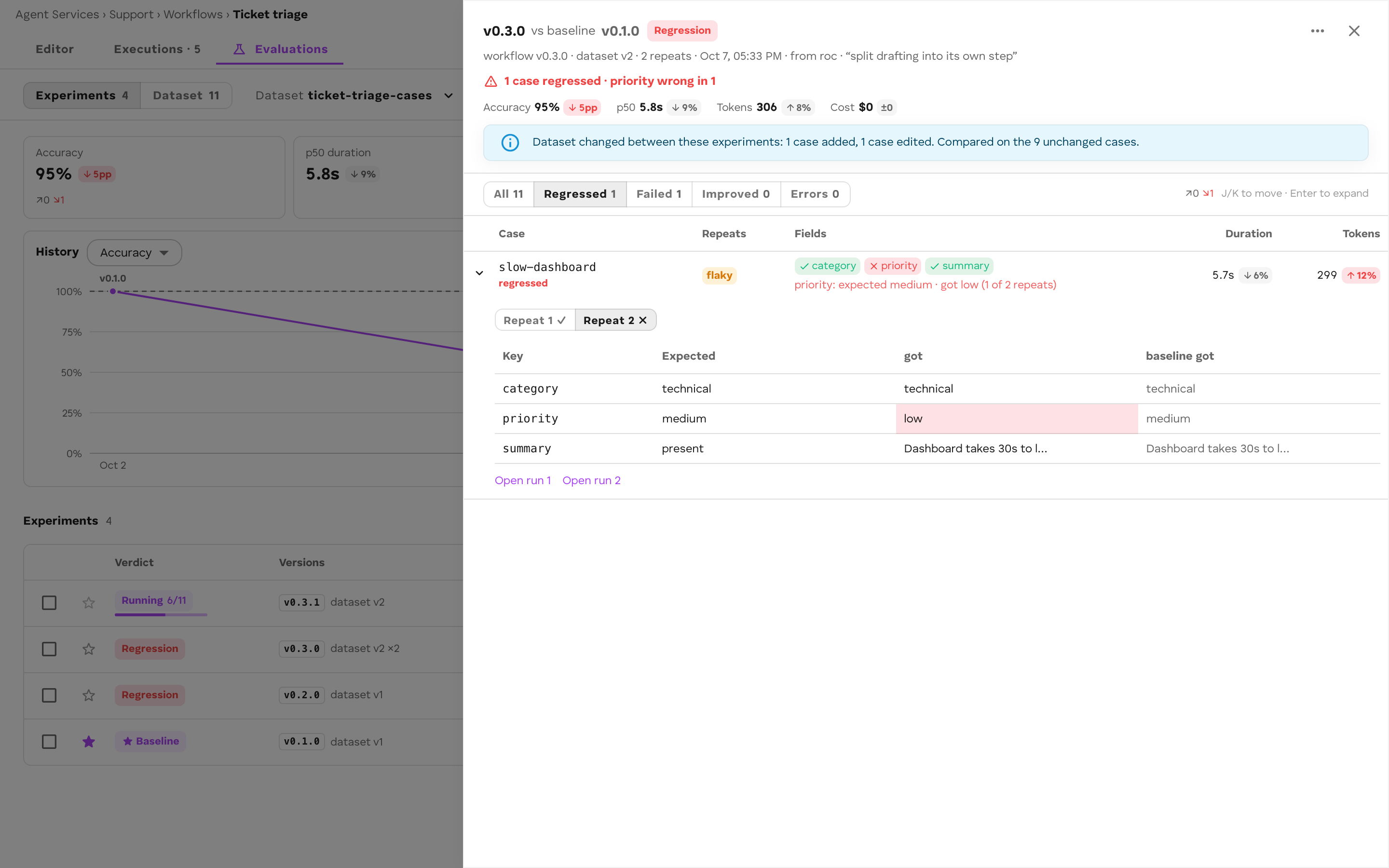
Open an experiment to see every case: its input, expected and actual fields, each repeat’s status (pass, fail, flaky, error, missing), and Open run, which takes you to that run on the Runs tab.
With the CLI, mk eval show prints one experiment’s summary, its per-field accuracy, and its per-case runs. An experiment id is global, so no dataset is needed:
mk eval show exp-mgfz8c1k-a1b2mk eval show exp-mgfz8c1k-a1b2 --json # { experiment, runs }Choose a baseline
The baseline is per dataset. Click the star on an experiment’s row (a finished experiment, or a cancelled one with runs on file), or choose Make baseline in a finished experiment’s menu. Until you choose one, ROC compares against the first finished experiment of the live version, else the first finished experiment. Reset baseline to default, in the dataset’s menu on the Datasets view, clears your choice. The CLI compares against the stored baseline, or --baseline.
Set it from the CLI with mk eval baseline, or clear it with --reset:
mk eval baseline triage exp-mgfz8c1k-a1b2mk eval baseline triage --resetThe experiment must belong to this dataset’s workflow, or the command errors; pass an experiment or --reset, not both.
Good practice: run the dataset on the live version, make that experiment the baseline, and judge every candidate version against it. Move the baseline when you switch the live version.
Compare two experiments
In ROC, tick two experiments on the same dataset and select Compare, or choose Compare with baseline… from an experiment’s menu.
With the CLI:
mk eval compare exp-mgfz8c1k-a1b2 exp-mgg0p2xq-9zt4The comparison lists accuracy, duration p50 and p95, tokens/run, cost/run, steps/run, and limit breaches for both sides with their deltas, then every run that changed (improved, regressed, only-in-base, only-in-candidate).
Only cases present on both sides at the same revision are compared. When the dataset changed between the two experiments, the comparison says so (Dataset changed between these experiments: 1 case added, 1 expectation edited. Compared on the 10 unchanged cases.) and leaves the changed cases out.
Use in CI
mk eval run exits non-zero only when it cannot run (bad flags, credentials, an unknown dataset). A regression does not fail the command. Read the JSON and decide:
mk eval run triage --workflow-version "$CANDIDATE" --repeats 3 --json > experiment.json
jq -e '.comparison == null or .comparison.counts.regressed == 0' experiment.jsonjq -e '.experiment.summary.passRate >= 0.9' experiment.json
The JSON is { experiment, result, comparison? }: the experiment with its summary, the Result compatibility check, and the comparison with the baseline when there is one.
summary.passRate is passed over passed + failed; runs the harness could not start (status: "error") are reported in summary.errored and are not in it. Check errored too, or ROC’s Accuracy and your CI gate will disagree.
Practical rules for CI:
- Run against a candidate version that is pushed but not live; the experiment pins it for its own runs only.
- Keep the CI dataset small (tens of cases) and the repeats low; run the full dataset before you switch the live version.
- Run in a vault reserved for testing. An experiment’s runs are real runs.